Basic Usage Tutorial#
This tutorial will walk you through the basic workflow of using Neurodent for rodent EEG analysis.
Overview#
Neurodent provides a streamlined workflow for:
Loading EEG recordings from various formats
Extracting features from continuous data (Windowed Analysis)
Visualizing and analyzing results
Let’s get started!
1. Installation and Setup#
First, ensure you have Neurodent installed. See the Installation Guide for detailed instructions.
pip install neurodent
Or with uv:
uv init yourprojectname
cd yourprojectname
uv add neurodent
2. Import Required Modules#
Let’s import the necessary modules from Neurodent:
Tip: To see detailed progress information during processing, check out the Configuration Guide to learn how to enable logging.
from pathlib import Path
from datetime import datetime

import matplotlib.pyplot as plt

from neurodent import (
    LongRecordingOrganizer,
    AnimalOrganizer,
    AnimalAnalyzer,
    WindowAnalysisResult,
    AnimalPlotter,
    ExperimentPlotter,
    set_channel_map,
)
from neurodent.core.utils import get_temp_directory, set_temp_directory
/home/runner/work/neurodent/neurodent/.venv/lib/python3.10/site-packages/tqdm/auto.py:21: TqdmWarning: IProgress not found. Please update jupyter and ipywidgets. See https://ipywidgets.readthedocs.io/en/stable/user_install.html
  from .autonotebook import tqdm as notebook_tqdm
# Exact channel names from your data
set_channel_map({
    "LMot": ["C-015", "D-015"],
    "RMot": ["C-016", "D-016"],
    "LBar": ["C-014", "D-014"],
    "RBar": ["C-017", "D-017"],
    "LHip": ["C-012", "D-012"],
    "RHip": ["C-019", "D-019"],
    "LAud": ["C-009", "D-009"],
    "RAud": ["C-022", "D-022"],
    "LVis": ["C-010", "D-010"],
    "RVis": ["C-021", "D-021"],
})
3. Configure Temporary Directory (Optional)#
Neurodent uses a temporary directory for intermediate files during processing. You can set this to a location with sufficient space:
# Set temporary directory for intermediate files
# set_temp_directory("/path/to/your/temp/dir")

# Or use the default temp directory
print(f"Using temp directory: {get_temp_directory()}")
Using temp directory: /tmp
4. Load EEG Data#
Neurodent supports multiple data formats through LongRecordingOrganizer (LRO):
SpikeInterface mode (
mode="si"): Load any format supported by SpikeInterface (EDF, NWB, Open Ephys, Neuralynx, binary, etc.). Useextract_funcfor custom readers.MNE mode (
mode="mne"): Load any format supported by MNE-Python.Pre-created recording (
mode=None, recording=...): Pass an already-loaded SpikeInterfaceBaseRecordingdirectly.
Loading a single file#
The simplest way to load data is to point LRO to a file path. Here we load a small EDF recording shipped with the repository:
Sample recordings#
sample_dataset() returns the recordings bundled with the package: a 60-second
ColMajor .bin + Meta .csv pair per animal, and a 5-second .edf. Reading .edf
needs pip install neurodent[readers].
from neurodent.data import sample_dataset

SAMPLE_DATA = sample_dataset()
Using your own data#
Replace SAMPLE_DATA with your own directory and set extract_func for your format.
Data Loading covers readers and patterns.
# Load an EDF file by passing a single path
lro = LongRecordingOrganizer(
    item=str(SAMPLE_DATA / "A10" / "A10_recording.edf"),
    mode="si",
    extract_func="read_edf",
    manual_datetimes=datetime(2023, 12, 13),
)

print(f"Sampling frequency: {lro.meta.f_s}")
print(f"Number of channels: {lro.meta.n_channels}")
print(f"Duration: {lro.LongRecording.get_total_duration():.1f} s")
Sampling frequency: 1000.0
Number of channels: 10
Duration: 5.0 s
Loading multi-file formats with DiscoveredFile#
Some formats consist of multiple files per recording (e.g. a .bin
data file paired with a .csv metadata file). Wrap these paths in
a DiscoveredFile so the LRO treats them as a single unit:
from neurodent.loading import DiscoveredFile

# Two files that together form one recording
discovered = DiscoveredFile(
    paths=(
        str(SAMPLE_DATA / "A10" / "Cage 2 A10-0_ColMajor.bin"),
        str(SAMPLE_DATA / "A10" / "Cage 2 A10-0_Meta.csv"),
    ),
)

lro_bin = LongRecordingOrganizer(
    item=discovered,
    mode="si",
    extract_func="neurodent.readers:read_bin_csv_pair",
    manual_datetimes=datetime(2023, 12, 13),
)

print(f"Sampling frequency: {lro_bin.meta.f_s}")
print(f"Number of channels: {lro_bin.meta.n_channels}")
print(f"Channel names: {lro_bin.meta.channel_names}")
Sampling frequency: 1000.0
Number of channels: 10
Channel names: ['C-009', 'C-010', 'C-012', 'C-014', 'C-015', 'C-016', 'C-017', 'C-019', 'C-021', 'C-022']
5. Create Animal Organizer#
The AnimalOrganizer (AO) uses placeholder patterns (e.g. {animal}, {session}) to discover and group recordings automatically. For multi-file formats, pass a list of patterns, with one per file type:
# Multi-pattern for paired bin/csv files
ao = AnimalOrganizer(
    pattern=[
        str(SAMPLE_DATA / "{animal}" / "*_ColMajor.bin"),
        str(SAMPLE_DATA / "{animal}" / "*_Meta.csv"),
    ],
    animal_id="A10",
    lro_kwargs={
        "mode": "si",
        "extract_func": "neurodent.readers:read_bin_csv_pair",
        "manual_datetimes": datetime(2023, 12, 13),
    },
)

print(f"Animal Organizer created for {ao.animal_id}")
Animal Organizer created for A10
6. Compute Windowed Analysis Results (WAR)#
Now we can compute features from the EEG data. Neurodent extracts features in time windows:
# Compute windowed analysis with selected features
# You can specify 'all' or list specific features
features = ['rms', 'psdband', 'cohere', 'psd']

analyzer = AnimalAnalyzer(ao)
analyzer.compute_bad_channels()  # calculate scores for LOF-based filtering

war = analyzer.compute_windowed_analysis(
    features=features,
    multiprocess_mode='serial'  # Options: 'serial', 'dask'
)

print(f"Windowed analysis completed!")
print(f"Features computed: {features}")
Windowed analysis completed!
Features computed: ['rms', 'psdband', 'cohere', 'psd']
Processing rows:   0%|          | 0/12 [00:00<?, ?it/s]
Processing rows:  33%|███▎      | 4/12 [00:00<00:00, 39.42it/s]
Processing rows:  67%|██████▋   | 8/12 [00:00<00:00, 39.61it/s]
Processing rows: 100%|██████████| 12/12 [00:00<00:00, 39.03it/s]
Processing rows: 100%|██████████| 12/12 [00:00<00:00, 39.08it/s]
7. Filter and Clean Data#
Neurodent provides filtering methods to remove artifacts and outliers:
# Apply filtering using method chaining
war_filtered = (
    war
    .filter_logrms_range(z_range=3)   # Remove outliers based on log RMS
    .filter_high_rms(max_rms=500)     # Remove high amplitude artifacts
    .filter_low_rms(min_rms=10)       # Remove low amplitude periods
)

print("Filtering completed!")
Filtering completed!
8. Basic Visualization#
Single Animal Plots#
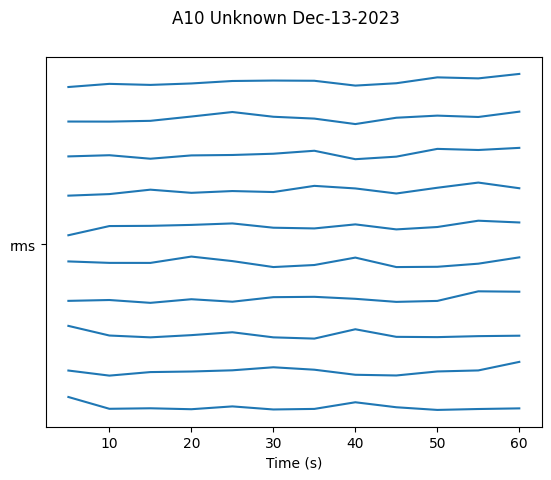
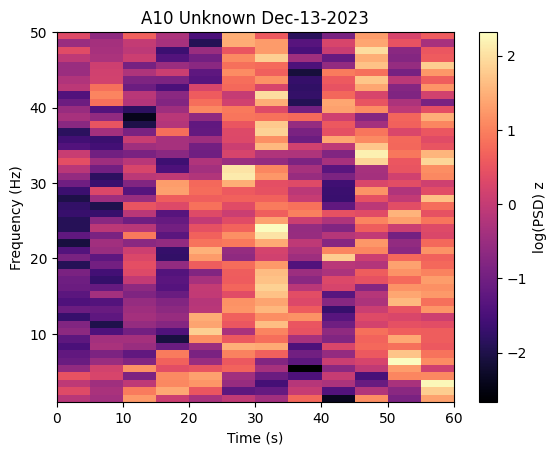
Use AnimalPlotter to visualize data over time from a single animal.
# Create plotter for single animal.
# AnimalPlotter methods draw and display the figure themselves and return None,
# so there is nothing to assign and no need to call plt.show().
ap = AnimalPlotter(war_filtered)

# Plot RMS over time
ap.plot_linear_temporal(features=['rms'])

# Plot the power spectrogram
ap.plot_psd_spectrogram()
9. Aggregate Time Windows (Optional)#
Average windows within each session and light/dark phase, which is the default groupby=['animalday', 'isday']. This saves memory and summarises a session.
Note: You should not aggregate before plotting time-series data with
AnimalPlotter, as this removes the temporal information needed for over-time visualizations.
# Example: Aggregate for summary statistics
war_aggregated = war_filtered.copy()
war_aggregated.aggregate_time_windows()
/home/runner/work/neurodent/neurodent/src/neurodent/results/window_analysis_result.py:561: FutureWarning: DataFrameGroupBy.apply operated on the grouping columns. This behavior is deprecated, and in a future version of pandas the grouping columns will be excluded from the operation. Either pass `include_groups=False` to exclude the groupings or explicitly select the grouping columns after groupby to silence this warning.
  aggregated_df = result_grouped.apply(
Multi-Animal Comparison#
To compare across multiple animals, use ExperimentPlotter. Here we
build a second WAR for animal F22 so we can compare the two:
# Build a WAR for a second animal (F22)
ao_f22 = AnimalOrganizer(
    pattern=[
        str(SAMPLE_DATA / "{animal}" / "*_ColMajor.bin"),
        str(SAMPLE_DATA / "{animal}" / "*_Meta.csv"),
    ],
    animal_id="F22",
    lro_kwargs={
        "mode": "si",
        "extract_func": "neurodent.readers:read_bin_csv_pair",
        "manual_datetimes": datetime(2023, 12, 12),
    },
)

analyzer_f22 = AnimalAnalyzer(ao_f22)
analyzer_f22.compute_bad_channels()

war_f22 = analyzer_f22.compute_windowed_analysis(
    features=features, multiprocess_mode="serial"
)
war_f22_filtered = (
    war_f22
    .filter_logrms_range(z_range=3)
    .filter_high_rms(max_rms=500)
    .filter_low_rms(min_rms=10)
)

# Create ExperimentPlotter with both animals
wars = [war_filtered, war_f22_filtered]

ep = ExperimentPlotter(
    wars,
    features=features,
    plot_order={'genotype': ['Unknown']},  # genotype is set via samples config; 'Unknown' is the default
)

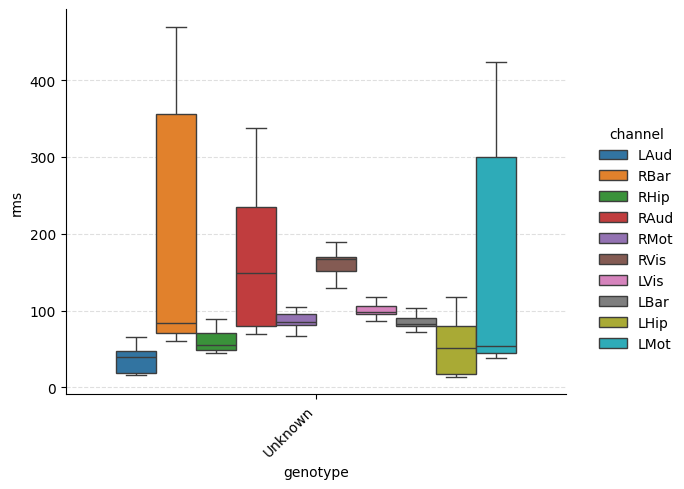
# Categorical plot grouped by genotype
ep.plot_catplot(
    'rms',
    groupby='genotype',
    kind='box',
    catplot_params={'showfliers': False},
)
plt.show()

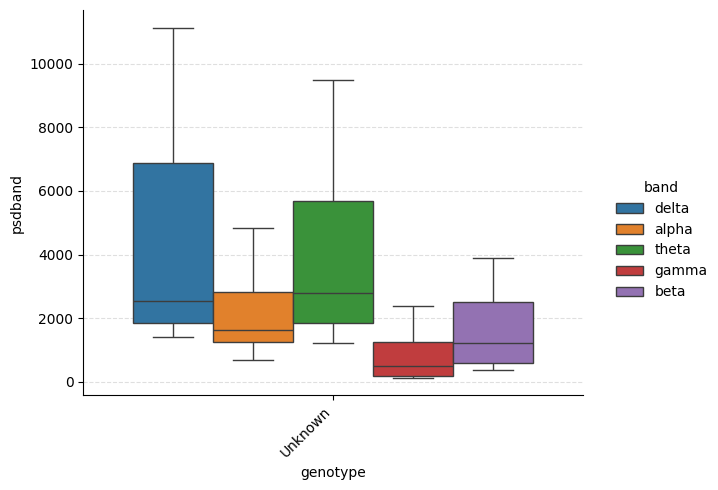
# PSD band powers grouped by genotype
ep.plot_catplot(
    'psdband',
    groupby='genotype',
    x='genotype',
    hue='band',
    kind='box',
    collapse_channels=True,
    catplot_params={'showfliers': False},
)
plt.show()
Processing rows:   0%|          | 0/12 [00:00<?, ?it/s]
Processing rows:  42%|████▏     | 5/12 [00:00<00:00, 40.18it/s]
Processing rows:  83%|████████▎ | 10/12 [00:00<00:00, 40.22it/s]
Processing rows: 100%|██████████| 12/12 [00:00<00:00, 39.75it/s]
10. Save Results#
You can save your WAR objects for later analysis:
import tempfile

# Use a temporary directory for demonstration purposes
with tempfile.TemporaryDirectory() as tmpdir:
    output_path = Path(tmpdir) / "A10"
    output_path.mkdir(parents=True, exist_ok=True)

    # Save WAR as parquet + json
    war_filtered.save_parquet_and_json(folder=output_path)
    print(f"WAR saved to {output_path}")

    # Load WAR
    war_loaded = WindowAnalysisResult.load_parquet_and_json(output_path)
    print(f"Loaded result for {war_loaded.animal_id}")
WAR saved to /tmp/tmpn5tipqik/A10
Loaded result for A10
Next Steps#
Data Loading Tutorial: Learn about loading different data formats
Windowed Analysis Tutorial: Deep dive into feature extraction
Visualization Tutorial: Advanced plotting techniques
Spike Analysis Tutorial: Frequency-domain spike detection